Status: Field validation
Bus Passenger Counting System
See how many passengers actually board and alight at each door.
Bu sayfanın Türkçesi de var. Türkçe görüntüle
Detect parking violations with evidence, without scanning recordings one by one.
Current status: Tried as a pilot application in one municipality.
Drag the slider to compare today with EntropyWork.
Parking Violation Penalty Processing Integration: today's situation compared with the EntropyWork solution
Today
Recordings are scanned by hand
Consistency and reliable record-keeping suffer.
With EntropyWork
Violations ready with evidence
Plate, photo and video go to the administration for approval.
Some municipalities check the municipality's no-parking zones from recording devices, detect violations manually and by hand, and then carry out penalty procedures.
Pick a step to follow the data from the field to the center.
Step 01
Your existing recording system
Step 02
Violation time and plate
Step 03
Reviewed with evidence
Step 04
Sent after approval
Only confirmed values are listed.
| Feature | Value / Status |
|---|---|
| Processing location | The center where the NVRs are located |
| Supported systems | NVR and VMS systems such as Hanwha, Hikvision and Dahua |
| Plate recognition | OCR |
| Plate reading accuracy | 98%, measured in a single municipal pilot |
| Data sent to the administration | Plate, photo, time, short video |
| Component | Function |
|---|---|
| NVR / VMS | The municipality's existing recording system; it is the video source. |
| Integration and processing unit | Runs at the center where the NVRs are located; exports the recording and reads the plate. |
| License plate recognition software | Reads the plate with OCR. |
| Administration verification stage | The stage at which the administration verifies the violation. |
| Notification module | Sends the verified violation by email, SMS or API. |
The system integrates with the municipality's existing recording devices. Integration with existing systems can be provided.
Sending to the person concerned is done by email, SMS or API.
The following information is sent to the municipality:
Installation takes about 30 minutes.
Installation time varies by product and site.
Fill in the form; the product name is added for you.
Prefer e-mail? info@entropywork.com
See how many passengers actually board and alight at each door.
The operator no longer has to watch every screen; the system raises an alarm when something happens.
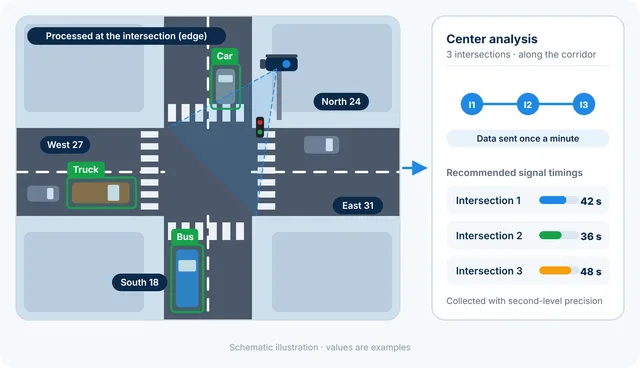
Vehicle counting and classification from intersection cameras, with the most suitable signal timings calculated from several intersections together.