Status: In pilot
Road Safety Video Analytics System
The operator no longer has to watch every screen; the system raises an alarm when something happens.
Bu sayfanın Türkçesi de var. Türkçe görüntüle
See how many passengers actually board and alight at each door.
Current status: Operated at building entrances and exits; vehicle installation is being prepared.
Drag the slider to compare today with EntropyWork.
Bus Passenger Counting System: today's situation compared with the EntropyWork solution
Today
Validator data is incomplete
Riders who do not tap a card, and those alighting, are not counted.
With EntropyWork
Real counts from door cameras
Boardings and alightings are counted by camera and matched to the stop via GPS.
Most municipal bus operators today obtain passenger numbers in two ways: validator (card tap) data or manual counting. Even where validator data works very well, this method may not cover the entire count; in some places, counting is done by hand.
The APC system aims to close this gap with a low budget and automatic counting per door.
Pick a step to follow the data from the field to the center.
Step 01
Sees boarding and exits
Step 02
Processes video on the vehicle
Step 03
Links counts to stops
Step 04
Receives count data only
Because the image is processed on the vehicle, count data rather than raw video is sent to the center. This approach reduces both the data transfer load and the privacy risk.
Only confirmed values are listed.
| Feature | Value / Status |
|---|---|
| Camera | 1080p, 30 FPS, with shutter |
| Lighting conditions | Suppresses day and night light reflections as much as possible |
| Number of cameras | One camera per door |
| Processing | Inside the vehicle, on the edge device |
| Counting accuracy | Above 96%, measured at building entrances and exits; not yet measured on a vehicle |
| Component | Function |
|---|---|
| Door camera | Images passenger passage at each door. 1080p, 30 FPS, shutter-equipped. |
| In-vehicle counting unit (edge device) | Processes the image inside the vehicle, counts entries and exits and sends the data to the center. |
| Central software | Collects the count data, matches it with GPS and displays it filtered by time range. |
| Remote update | Allows the software to be updated without going to the vehicle. |
The system can be, or can be made, integrated with existing systems.
Camera installation and edge device connection are completed in about 1 hour and the system becomes ready for use.
Installation time varies by product and site.
Fill in the form; the product name is added for you.
Prefer e-mail? info@entropywork.com
The operator no longer has to watch every screen; the system raises an alarm when something happens.
Detect parking violations with evidence, without scanning recordings one by one.
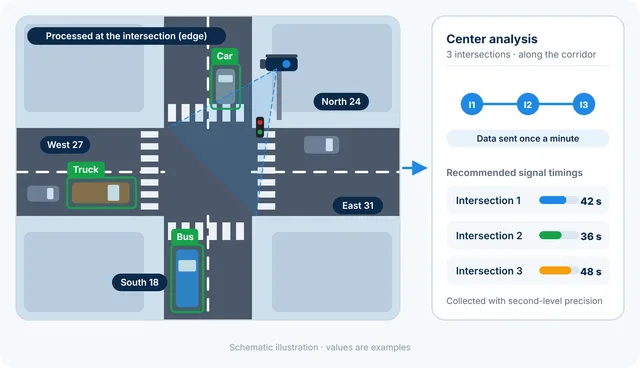
Vehicle counting and classification from intersection cameras, with the most suitable signal timings calculated from several intersections together.